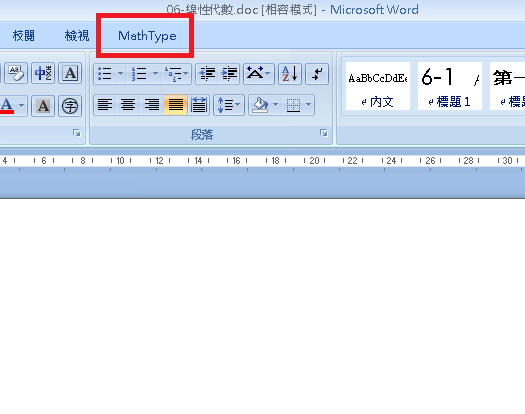
要使用MathType之前,請至這裡下載並安裝,我所使用的版本為6.7版。安裝完成之後,開啟Word便會在功能表列中出現MathType的tag,如下圖所示:
由於以下功能可能需要完整版的MathType才可使用,請各位自行取得正版之序號。
為了要能正確地顯示方程式,我們必須安裝MathPlayer,請至這裡下載並安裝。目前MathPlayer只能在IE上使用,尚未支援其他的瀏覽器。
假設我們要轉換下圖的方程式:

點選功能表列上MathType的tag,選擇中央的Convert Equations:

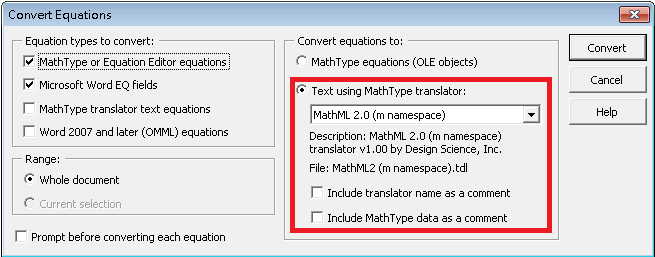
接著,在右邊的Convert equations to:的地方,請選擇Text using MathType translator,下拉選單請選擇MathML 2.0(m namespace),並將下面兩個checkbox取消選取,如下圖所示:
最後按下Convert,MathType便會替你把文件中的方程式轉換成MathML。我們會發現剛剛的方程式轉換成如下面的MathML:
<m:math>
<m:mrow>
<m:mi>y</m:mi><m:mo>=</m:mo><m:msup>
<m:mi>x</m:mi>
<m:mn>2</m:mn>
</m:msup>
</m:mrow>
</m:math>
至此方程式便轉換完成,接著我們需要將它放至網頁中。假設我們的網頁原始碼如下:
<html>
<head>
<title>Test Page</title>
</head>
<body>
<h1>This is test page for MathType</h1>
</body>
</html>
首先先將剛剛得到的MathML放至你想呈現的位置:
<html>
<head>
<title>Test Page</title>
</head>
<body>
<h1>This is test page for MathType</h1>
<m:math>
<m:mrow>
<m:mi>y</m:mi><m:mo>=</m:mo><m:msup>
<m:mi>x</m:mi>
<m:mn>2</m:mn>
</m:msup>
</m:mrow>
</m:math>
</body>
</html>
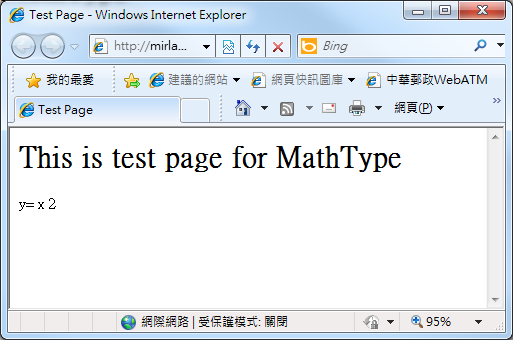
開啟網頁後,發現並沒有出現次方項的效果:
此時在網頁head區塊中加入以下的原始碼:
<object id=mmlfactory classid=clsid:32f66a20-7614-11d4-bd11-00104bd3f987
xmlns:ie5="http://www.w3.org/tr/wd-xsl"
xmlns:doc="http://www.dcarlisle.demon.co.uk/xsldoc"
xmlns:fns="http://www.w3.org/2002/math/preference"
xmlns:msxsl="urn:schemas-microsoft-com:xslt"
xmlns:h="http://www.w3.org/1999/xhtml"
xmlns:xsl="http://www.w3.org/1999/xsl/transform">
</object>
<?import namespace=m urn="http://www.w3.org/1998/math/mathml" implementation = "#mmlfactory" declarenamespace />
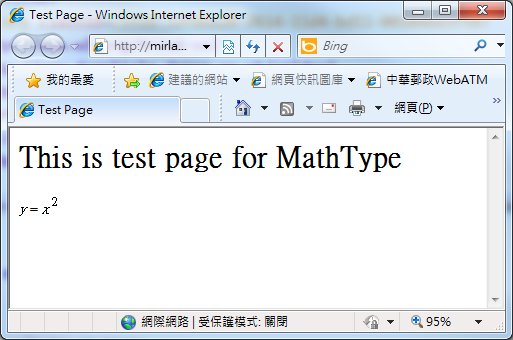
重新整理網頁後,就能正確地顯示方程式了!
回首頁
